December Release notes

December Release notes

Dec 8, 2025

Review the latest updates and bug fixes for the December Release

December Release notes


Last updated on December 8, 2025


1. Cloud Integrations


BrightSign Cloud Integration

Manage your BrightSign digital signage devices directly from NetSpeek - firmware updates, network configuration, diagnostics, and more.

  • Configure network, display, firmware, and SSH settings remotely

  • Video mode configuration with HDMI output selection

  • Device reprovisioning support


Poly Lens Integration Enhancements

Expanded Poly device management with new actions: meeting control, occupancy data, and optimized performance with token caching.

  • Meeting Control - Start and stop meetings directly from NetSpeek

  • Occupancy Data - Retrieve room occupancy and usage analytics

  • Get Device Status - Real-time device health and connection status with active app info

  • Get Device Logs - Pull diagnostic logs for troubleshooting

  • Reboot Device - Remote device restart capability

  • Optimized Queries - Faster getAllDevices query performance



2. Device Support & Compatibility


Supported Device Models by Manufacturer

NetSpeek now supports 200+ device models across 12 manufacturers, providing unified management for video conferencing, digital signage, audio systems, and collaboration devices.

Barco — Video Conferencing

Requires NetSpeek Edge
ClickShare CX-50 Gen2, CX-30 Gen2, CX-20 Gen2
ClickShare CX-50, CX-30, CX-20
ClickShare Conference C-10, C-5


BrightSign — Digital Signage ⭐ NEW

Requires BSN Cloud
XT Series: XT5, XT4, XT3
XD Series: XD5, XD4, XD3
XC Series: XC5
LS Series: LS5, LS4
HS Series: HS5
HD Series: HD5, HD4, HD3
AU Series: AU5


HP/Poly — Video Conferencing & Audio ⭐ ENHANCED

Requires Poly Lens Premium and Poly Premium Enterprise subscription
PolyOS local API integration targeted for Q1 2026


Video Bars & Cameras:
Poly Studio X72, X70, X52, X50, X30
Poly Studio V72, V52, V12
Poly Studio E70, E60
Poly Studio G62, G7500
Poly Studio R30
Poly Studio USB
Poly EagleEye Cube USB

Audio & Accessories:
Poly Trio 8800, Trio C60
Poly Studio A2 Audio Bridge
Poly Studio A2 Table Microphone
Poly TC10, TC8


Microsoft Teams — Teams rooms

Microsoft Teams Rooms on Windows
Microsoft Teams Rooms on Android


Neat — Video Conferencing

Requires Neat Pulse Plus or Pro Subscription


Neat Bar, Bar Gen 2, Bar Pro
Neat Board, Board 50, Board Pro
Neat Frame
Neat Pad
Neat Center


Logitech — Video Conferencing

Requires Logi Sync Essential or Select Subscription
CollabOS local API supported for LNA API devices via NetSpeek Edge


Rally Series:
Rally, Rally Plus, Rally Camera
Rally Bar, Rally Bar Mini, Rally Bar Huddle
Rally Board 65

Room Solutions:
RoomMate
MeetUp, MeetUp 2
Sight, Scribe
Tap, Tap IP, Tap Scheduler
Swytch, Spot, Extend


LG — Digital Signage

Requires NetSpeek Edge


UT640S Series
TNF Series
SM Series
UL/UH/UM Series
BH Series
WP Series
XS Series
V Series


Samsung — Digital Signage

Requires NetSpeek Edge
Model series may require EWS or MDC integration — see Support Portal


Q Series Commercial:
QBC, QMC, QHC Series
QBB, QMB, QHB Series
QB R, QM R, QH R Series

Specialized:
OM Series (Outdoor)
OH Series (High Brightness)

Interactive Flip:
WMH (Flip 1.0) Series
WMR (Flip 2.0) Series
WMA (Flip 3.0) Series


Sharp NEC — Commercial Displays

Requires NetSpeek Edge


MultiSync P Series
MultiSync V Series
MultiSync ME Series
MultiSync M Series


Shure — Professional Audio

Requires NetSpeek Edge + Shure SystemAPI
Note: SystemAPI cannot be installed on the same PC as IntelliMix Room


IntelliMix & DSP:
IntelliMix Room Kits - Compute
IntelliMix Room
P300, ANIUSB

Microphones:
MXA310, MXA710, MXA901-R, MXA902
MXA910, MXA920
MXN5-C
MXA-NMB (Mute)

Wireless Systems:
MXWANI4, MXWANI8
MXWAPT2, MXWAPT4, MXWAPT8
MXW1 (BPT), MXW2 (HHMT), MXW6 (BMT), MXW8 (GMT)
MXWNCS2, MXWNCS4, MXWNCS8
MXWAPDX2
MXW1X (BPT), MXW2X (HHMT), MXW6X (BMT)

ULX-D & QLX-D:
QLXD4
ULXD4, ULXD4D, ULXD4Q
ULXD6 (BMT), ULXD8 (GMT)

Chargers:
SBC250, SBC450, SBC850
SBC220, SBC240

ULXD6/ULXD8 only support SystemAPI connectivity when docked in SBC250/450/850 chargers


Zoom — Video Conferencing

Zoom Rooms (all certified hardware)


3. Room Management


Room Canvas UI Enhancements

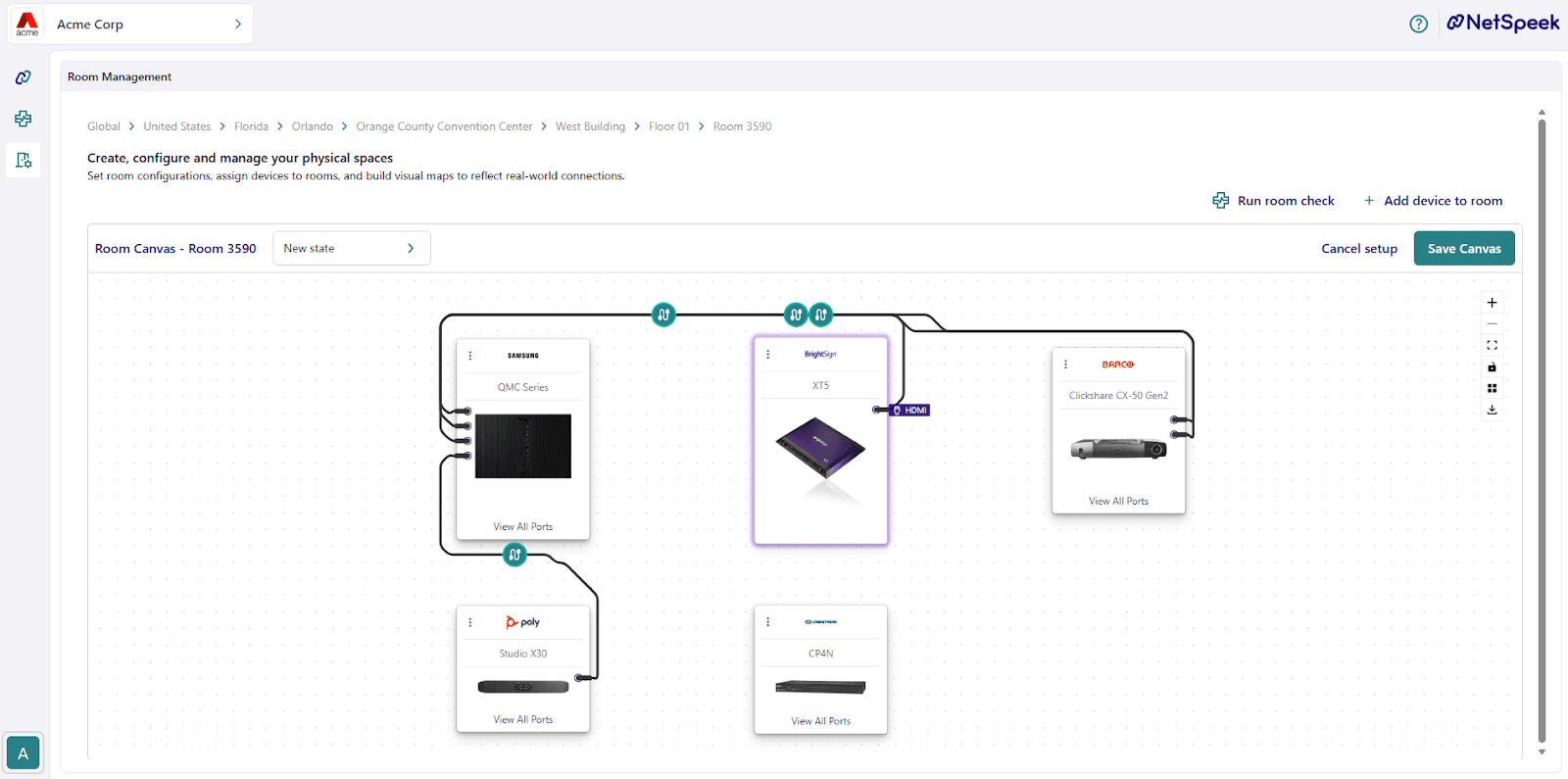
A completely refreshed experience for viewing and managing room devices and connections

  • Realistic cable visualization - New cable edge rendering with improved routing

  • Enhanced device cards - Status indicators, improved icons, and better color coding

  • Download diagrams - Export your room layouts as PNG images for documentation or sharing


4. Lena AI Enhancements


New Focus Modes (Expanded Support)

Lena now supports dedicated focus modes for faster, more accurate answers about specific vendors:


Aurora • Biamp • Extron • Huddly • QSC • NEC (Sharp) • Skykit • Sony


Vendor Knowledge Search

New vendor library/dictionary search for improved accuracy when answering product-specific questions.


Improved Reliability

  • More reliable conversations when switching between chat tabs

  • Smoother tab management - new sessions open correctly when opening a new browser tab/window

  • Prevents duplicate tabs - Opening chat from multiple windows no longer creates conflicting sessions

  • First-visit guidance - New users automatically see chat guidance on first visit

  • Enhanced LLM fallback handling for more stable responses

  • Improved location name conflict resolution


5. Device Management UX


Actions UI Redesign

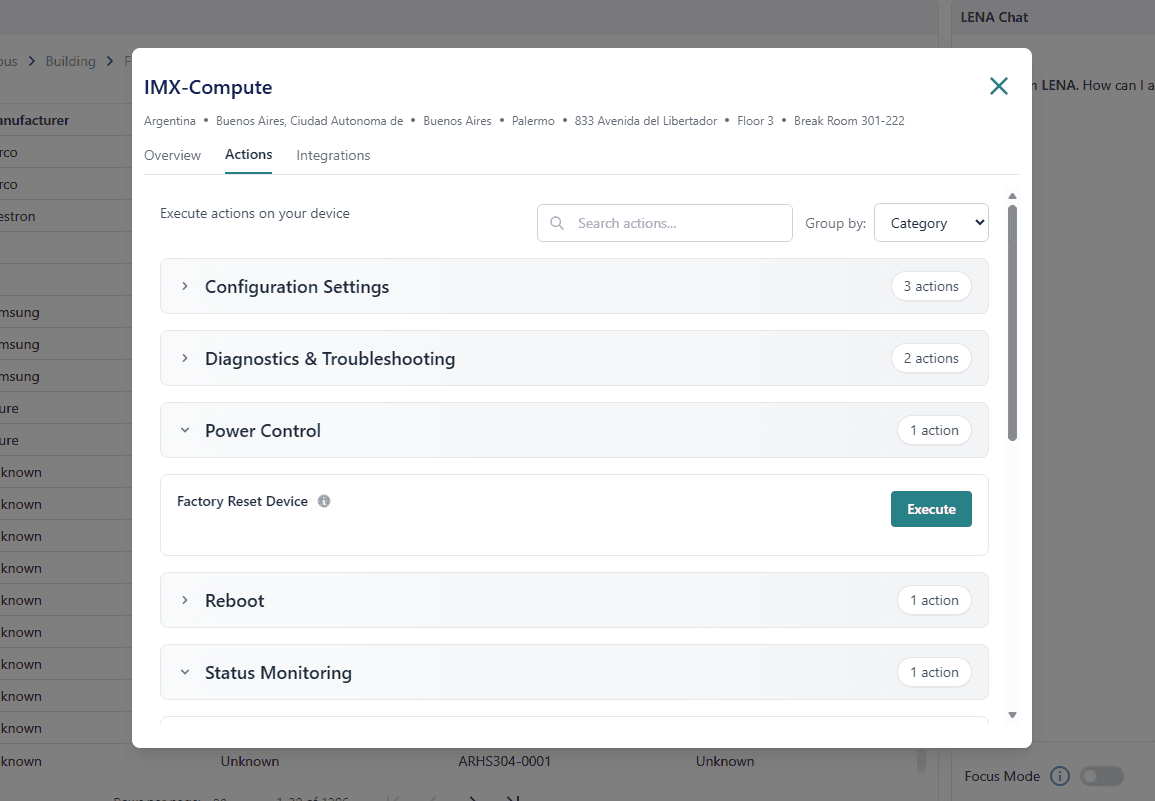
Redesigned with category grouping, action descriptions/tooltips, and a cleaner layout.

  • Actions now grouped by category by default for easier navigation

  • Action descriptions - Helpful tooltips explaining what each action does

  • Cleaner layout for action parameters

  • Device detail cards - Now default to Overview tab for quicker access


6. Security Enhancements


Security Improvements

All integration credentials are now encrypted at rest with improved login protection and secure API key hashing.

  • All integration credentials and API keys are now encrypted at rest

  • API key hashing - Edge integration API keys now securely hashed on create/update

  • Enhanced login protection against unauthorized access

  • Improved error messages for login issues

7. Bug Fixes

Bug Fixes (December)

This release includes a variety of general fixes to improve overall system stability.

  • Fixed Edge API key hashing logic

  • Fixed tab duplication when opening chat from multiple browser windows

  • Fixed LLM fallback issues causing conversation interruptions

  • Fixed DataSync deletion handling for removed endpoints


December Release notes


Last updated on December 8, 2025


1. Cloud Integrations


BrightSign Cloud Integration

Manage your BrightSign digital signage devices directly from NetSpeek - firmware updates, network configuration, diagnostics, and more.

  • Configure network, display, firmware, and SSH settings remotely

  • Video mode configuration with HDMI output selection

  • Device reprovisioning support


Poly Lens Integration Enhancements

Expanded Poly device management with new actions: meeting control, occupancy data, and optimized performance with token caching.

  • Meeting Control - Start and stop meetings directly from NetSpeek

  • Occupancy Data - Retrieve room occupancy and usage analytics

  • Get Device Status - Real-time device health and connection status with active app info

  • Get Device Logs - Pull diagnostic logs for troubleshooting

  • Reboot Device - Remote device restart capability

  • Optimized Queries - Faster getAllDevices query performance


2. Device Support & Compatibility


Supported Device Models by Manufacturer

NetSpeek now supports 200+ device models across 12 manufacturers, providing unified management for video conferencing, digital signage, audio systems, and collaboration devices.

Barco — Video Conferencing

Requires NetSpeek Edge
ClickShare CX-50 Gen2, CX-30 Gen2, CX-20 Gen2
ClickShare CX-50, CX-30, CX-20
ClickShare Conference C-10, C-5


BrightSign — Digital Signage ⭐ NEW

Requires BSN Cloud
XT Series: XT5, XT4, XT3
XD Series: XD5, XD4, XD3
XC Series: XC5
LS Series: LS5, LS4
HS Series: HS5
HD Series: HD5, HD4, HD3
AU Series: AU5


HP/Poly — Video Conferencing & Audio ⭐ ENHANCED

Requires Poly Lens Premium and Poly Premium Enterprise subscription
PolyOS local API integration targeted for Q1 2026


Video Bars & Cameras:
Poly Studio X72, X70, X52, X50, X30
Poly Studio V72, V52, V12
Poly Studio E70, E60
Poly Studio G62, G7500
Poly Studio R30
Poly Studio USB
Poly EagleEye Cube USB

Audio & Accessories:
Poly Trio 8800, Trio C60
Poly Studio A2 Audio Bridge
Poly Studio A2 Table Microphone
Poly TC10, TC8


Microsoft Teams — Teams rooms

Microsoft Teams Rooms on Windows
Microsoft Teams Rooms on Android


Neat — Video Conferencing

Requires Neat Pulse Plus or Pro Subscription


Neat Bar, Bar Gen 2, Bar Pro
Neat Board, Board 50, Board Pro
Neat Frame
Neat Pad
Neat Center


Logitech — Video Conferencing

Requires Logi Sync Essential or Select Subscription
CollabOS local API supported for LNA API devices via NetSpeek Edge


Rally Series:
Rally, Rally Plus, Rally Camera
Rally Bar, Rally Bar Mini, Rally Bar Huddle
Rally Board 65

Room Solutions:
RoomMate
MeetUp, MeetUp 2
Sight, Scribe
Tap, Tap IP, Tap Scheduler
Swytch, Spot, Extend


LG — Digital Signage

Requires NetSpeek Edge


UT640S Series
TNF Series
SM Series
UL/UH/UM Series
BH Series
WP Series
XS Series
V Series


Samsung — Digital Signage

Requires NetSpeek Edge
Model series may require EWS or MDC integration — see Support Portal


Q Series Commercial:
QBC, QMC, QHC Series
QBB, QMB, QHB Series
QB R, QM R, QH R Series

Specialized:
OM Series (Outdoor)
OH Series (High Brightness)

Interactive Flip:
WMH (Flip 1.0) Series
WMR (Flip 2.0) Series
WMA (Flip 3.0) Series


Sharp NEC — Commercial Displays

Requires NetSpeek Edge


MultiSync P Series
MultiSync V Series
MultiSync ME Series
MultiSync M Series


Shure — Professional Audio

Requires NetSpeek Edge + Shure SystemAPI
Note: SystemAPI cannot be installed on the same PC as IntelliMix Room


IntelliMix & DSP:
IntelliMix Room Kits - Compute
IntelliMix Room
P300, ANIUSB

Microphones:
MXA310, MXA710, MXA901-R, MXA902
MXA910, MXA920
MXN5-C
MXA-NMB (Mute)

Wireless Systems:
MXWANI4, MXWANI8
MXWAPT2, MXWAPT4, MXWAPT8
MXW1 (BPT), MXW2 (HHMT), MXW6 (BMT), MXW8 (GMT)
MXWNCS2, MXWNCS4, MXWNCS8
MXWAPDX2
MXW1X (BPT), MXW2X (HHMT), MXW6X (BMT)

ULX-D & QLX-D:
QLXD4
ULXD4, ULXD4D, ULXD4Q
ULXD6 (BMT), ULXD8 (GMT)

Chargers:
SBC250, SBC450, SBC850
SBC220, SBC240

ULXD6/ULXD8 only support SystemAPI connectivity when docked in SBC250/450/850 chargers


Zoom — Video Conferencing

Zoom Rooms (all certified hardware)


3. Room Management


Room Canvas UI Enhancements

A completely refreshed experience for viewing and managing room devices and connections

  • Realistic cable visualization - New cable edge rendering with improved routing

  • Enhanced device cards - Status indicators, improved icons, and better color coding

  • Download diagrams - Export your room layouts as PNG images for documentation or sharing


4. Lena AI Enhancements


New Focus Modes (Expanded Support)

Lena now supports dedicated focus modes for faster, more accurate answers about specific vendors:


Aurora • Biamp • Extron • Huddly • QSC • NEC (Sharp) • Skykit • Sony


Vendor Knowledge Search

New vendor library/dictionary search for improved accuracy when answering product-specific questions.


Improved Reliability

  • More reliable conversations when switching between chat tabs

  • Smoother tab management - new sessions open correctly when opening a new browser tab/window

  • Prevents duplicate tabs - Opening chat from multiple windows no longer creates conflicting sessions

  • First-visit guidance - New users automatically see chat guidance on first visit

  • Enhanced LLM fallback handling for more stable responses

  • Improved location name conflict resolution


5. Device Management UX


Actions UI Redesign

Redesigned with category grouping, action descriptions/tooltips, and a cleaner layout.

  • Actions now grouped by category by default for easier navigation

  • Action descriptions - Helpful tooltips explaining what each action does

  • Cleaner layout for action parameters

  • Device detail cards - Now default to Overview tab for quicker access


6. Security Enhancements


Security Improvements

All integration credentials are now encrypted at rest with improved login protection and secure API key hashing.

  • All integration credentials and API keys are now encrypted at rest

  • API key hashing - Edge integration API keys now securely hashed on create/update

  • Enhanced login protection against unauthorized access

  • Improved error messages for login issues

7. Bug Fixes

Bug Fixes (December)

This release includes a variety of general fixes to improve overall system stability.

  • Fixed Edge API key hashing logic

  • Fixed tab duplication when opening chat from multiple browser windows

  • Fixed LLM fallback issues causing conversation interruptions

  • Fixed DataSync deletion handling for removed endpoints